AI Architect: designing neural networks you can actually see
by Claudemir Casa, Co-Founder / CTO
The gap between the diagram and the model
Everyone who has built a neural network has drawn one first. Boxes, arrows, a note in the margin about the shape coming out of layer four. Then you write the code, and the diagram starts lying to you — a stride you forgot, a concatenate that needed a transpose, a shape mismatch that only surfaces three layers later as an error message about a dimension you never typed.
The drawing and the model drift apart because nothing connects them. The diagram is a picture; the model is code. Every tool that draws architectures has to choose: either it computes shapes itself and slowly diverges from the framework, or it stays decorative.
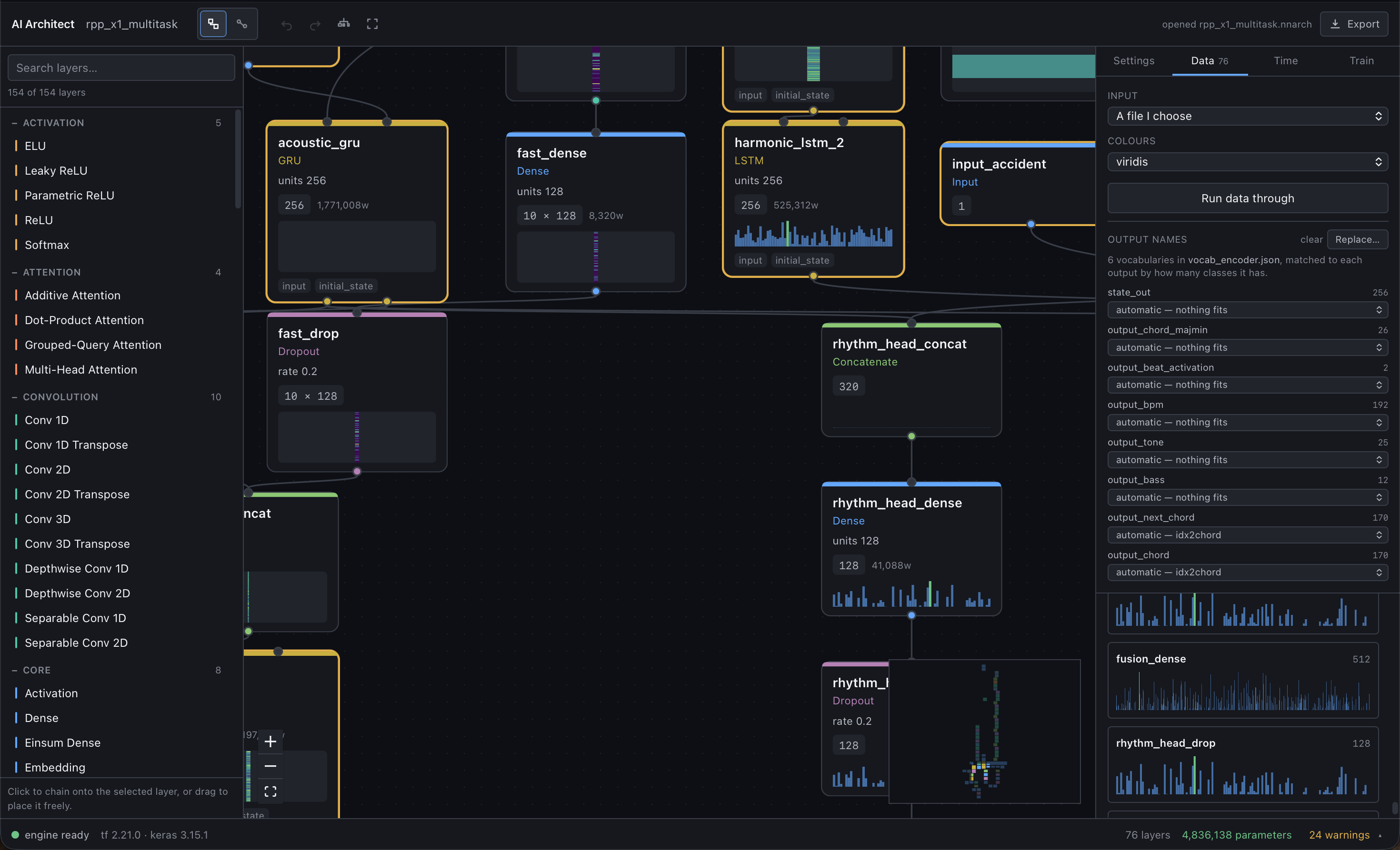
AI Architect takes the third option. It is a desktop editor that carries a real Python engine, and that engine never reimplements Keras. A layer's parameters come from its constructor signature. Its output shape comes from building it symbolically. Its activations come from actually running it. When TensorFlow changes, the catalog changes with it.
- layers in the catalog
- 154
- research-frontier architectures, each citing its paper
- 42
- tests on the engine
- 88
What it does
A catalog that is not hand-maintained. 112 stock Keras layers, derived from their constructors so the parameter list is the real one — not a subset somebody curated two releases ago. Alongside them, 42 implementations of research-frontier architectures: state-space models, KAN variants, modern attention, mixture of experts, spiking and graph layers. Each one cites the paper it comes from.
Validation that points at the layer that caused it. Shape errors appear on the offending node, worded as the engine's own message. You are not reading a translation of TensorFlow's complaint; you are reading TensorFlow's complaint, attached to the box that produced it.
Real activations. Feed an image, a recording, a tensor or a built-in dataset, and see what each layer actually produced — feature maps, attention matrices, spectrograms, class scores. The thumbnails inside the nodes in the screenshot above are not decoration. They are that model's output on that input.
Runs over time. For architectures that carry state, step through a recording with the feedback loops closed, then cut them and see whether anything changes. That question is usually answered by argument. Here it is answered by looking.
An optimiser that measures instead of asserting. It proposes changes and evaluates each one by building and timing it, keeping exact rewrites — the ones that cannot change your outputs — apart from substitutions that would need retraining. The distinction matters, and most advice about model efficiency blurs it.
Training in the app, with live loss and accuracy curves.
Reading a model instead of editing it
A 76-layer model is hard to think about on a canvas built for editing. So there is a second mode: analytical views that answer structural questions.
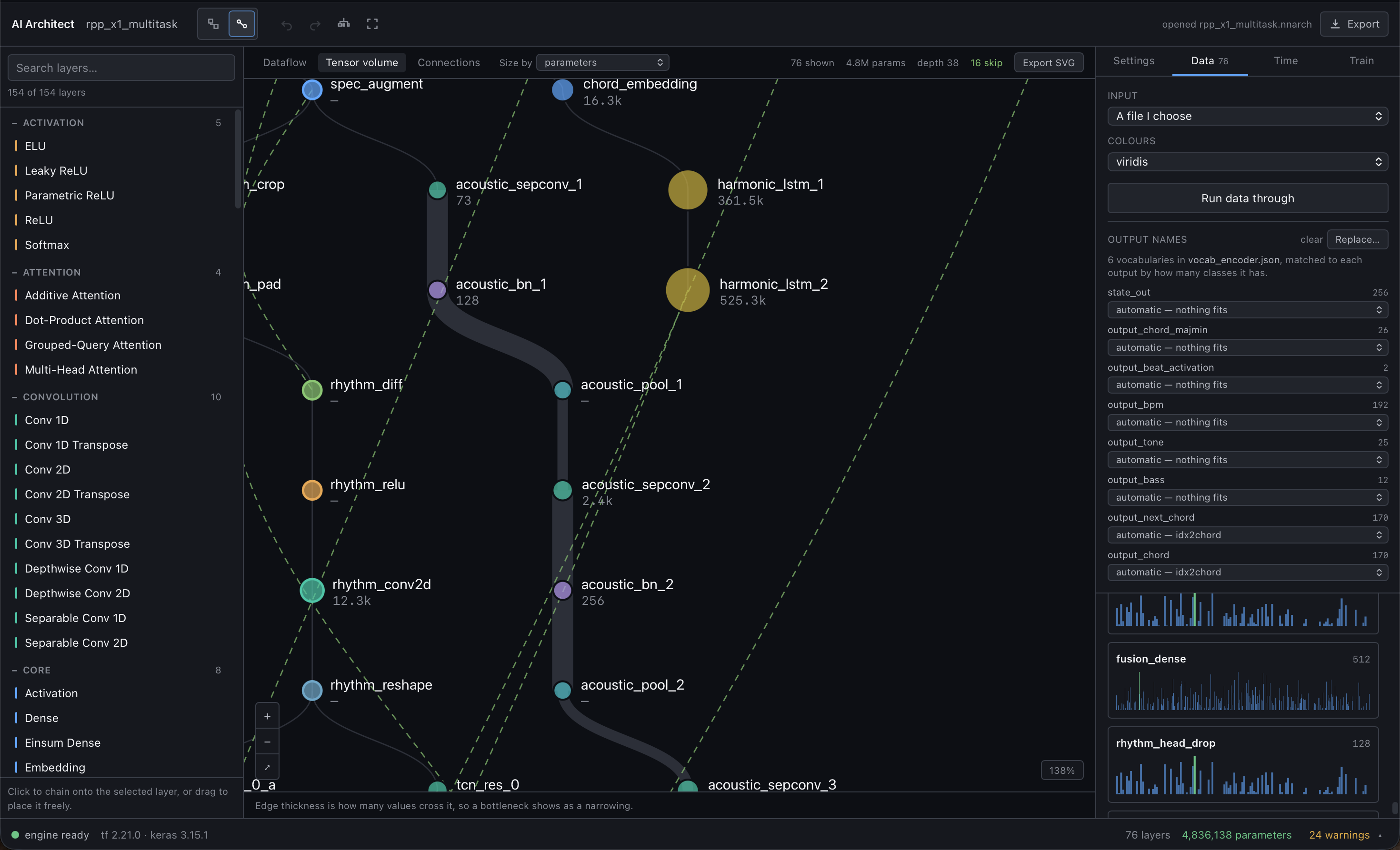
Circle area is the parameter count. Edge thickness is how many values cross that edge, so a bottleneck shows up as a visible narrowing. A dashed edge is a skip connection. There is a layered dataflow diagram for reading depth and branching, and a connectivity matrix for the cases where the graph is too tangled to trace by eye.
Top tip
The quickest way to understand somebody else's model is to import it and switch to tensor volume. Where the parameters actually live is almost never where you assumed from reading the code.
Import and export, both honest about their limits
You can bring in somebody else's model from a .keras archive, from Model.to_json() output, or from a .tflite file.
| Format | What comes back |
|---|---|
.keras | The architecture, functional or sequential, rebuilt parameter for parameter. Weights are not imported — this tool edits architectures, and weights would not survive the first change. |
.json | The same, from to_json(). |
.tflite | The converted graph. Layers, order and shapes are faithful; strides, padding and pool sizes live in the file's binary options and come back at their defaults. |
Two things an import cannot recover, and it says so rather than pretending. A layer the catalog does not have arrives as a pass-through that keeps its original class name and settings, so you can see exactly where it was. And a Lambda layer stores its function as compiled Python bytecode, which the importer does not execute — a model file downloaded from the internet is not a place to accept code from. Each one is listed with the output shape its expression has to produce.
Export goes the other way: a folder of plain Python that trains on its own. Custom layers travel as source. Nothing in the exported project imports this tool — if AI Architect disappeared tomorrow, the code it generated would still run. The compiler and the code generator read one shared table describing how each layer is called, which is what keeps the model running in the editor and the model the exported file builds from drifting apart.
Why it is a desktop application
TensorFlow is a gigabyte. Putting it in a web service means either running everyone's model on our hardware or shipping a crippled subset of the framework to the browser. Neither is the tool I wanted.
So the editor is a Tauri shell — the application bundle is about 8 MB, the disk image about 3 MB — and it does not carry Python or TensorFlow. On first launch it opens on a setup screen and installs them into your Application Support directory, outside the bundle, so they survive replacing the app. A gigabyte is too much to put in a download most people would never unpack.
The engine itself is FastAPI over a Keras compiler, speaking HTTP and WebSocket on a local port. The editor is React, TypeScript and React Flow. The desktop shell manages the engine's lifecycle, the native menus and the window. Running from source needs Python 3.13 exactly — TensorFlow 2.21 publishes no wheel for 3.14 — plus Node 20 and Rust 1.90. A packaged build needs none of it.
On testing a visual tool
The engine has 88 tests covering the catalog, the graph compiler, code generation, the research layers, project persistence, multi-input and multi-output models, audio input, output labelling, runs over time, and the optimiser.
The editor is checked differently, in a real browser driven by playwright-core through the Chrome you already have installed. Layout and geometry cannot be asserted any other way: a node that overlaps another, a graph that lays out off-screen, a panel that collapses at the wrong width — none of that is visible to a unit test. Those checks write screenshots, and the point is to read them.
The code
AI Architect lives at github.com/claudemircasa/AI-Architect — the engine, the editor, the desktop shell and the setup scripts, with a README that walks through running it from source and building the application.
It is proprietary, with collaboration permitted: you may use, study, modify and share it for personal, educational, academic and research purposes, and contribute changes back. Commercial exploitation is reserved to Governor.
Where it is going
The desktop shell and the packaging script are macOS-only today — the engine and the editor are not, which is the part worth saying out loud, because it means the port is packaging work rather than a rewrite.
If you build models and have ever lost an afternoon to a shape error that was really a thinking error, this was written for you. Clone it and try it, or get in touch if you want it pointed at a problem of your own.